
Every salesperson has the same graveyard. A prospect replies “interesting, tell me more” while you are in a meeting. You read it on your phone between calls, think “I will answer properly tonight”, and by tonight it is twelve conversations down with no badge on it. Nobody decided to ignore a warm lead. The inbox simply has no memory of who you owe a reply.
Why the Unread filter does not catch them
Unread tracks whether you opened a message, not whether you answered it. The moment you open a conversation, on any device, it stops being unread. That is exactly the moment a busy person reads a reply and postpones the answer. So the replies most likely to be forgotten are the ones Unread is built to hide.
| Situation | Shows in Unread? | Waiting on you? |
|---|---|---|
| They replied, you have not opened it | Yes | Yes |
| They replied, you read it on your phone | No | Yes |
| You read it, typed half an answer, closed the tab | No | Yes |
| You sent the last message | No | No, the ball is with them |
| They accepted your request, nobody wrote anything | No | Yes, and it is the easiest win you have |
How to find unanswered LinkedIn messages by hand
This takes ten to fifteen minutes for a few weeks of messages. Do it on desktop, where the inbox shows a preview line under every conversation.
- Open LinkedIn Messaging on desktop. Go to linkedin.com/messaging. Start at the top; the newest conversations matter most.
- Read the preview line, not the name. Under each name is the latest message. If it starts with "You:", you wrote last. If it does not, they did. Those are your unanswered conversations.
- Mark them so they stay visible. Open the options on each one and choose Mark as unread, or star it. Now Unread and Starred show your real to-do list.
- Check every folder your inbox shows. If your inbox splits conversations into tabs or folders, a prospect can land in the one you never open. Look through each.
- Reply newest first. Answer the recent ones properly. For anything older than a couple of weeks, acknowledge the gap and give a fresh reason to talk.
It works. The catch is that it is a scan you have to repeat, and it gets slower the more conversations you have, which is exactly when it matters most.
The other list: people who accepted and never heard from you
Unanswered replies are the obvious leak. The quieter one is the person who accepted your connection request and then got nothing. They said yes to you, which is the warmest signal cold outreach produces, and the moment cools in days.
LinkedIn notifies you when someone accepts, but keeps no list of accepted people you have not messaged. To find them by hand: My Network, Connections, sort by Recently added, and check each of the last few weeks’ connections for a conversation. Anyone with none is on your list.
How to track unanswered LinkedIn messages automatically
Outscore does the scan for you. As you use LinkedIn, it records your connection requests and what happened to them, and when you have Messaging open it reads the conversation list on your screen: who wrote last, when, and the latest line. It never opens a conversation by itself and never sends anything. From that, the side panel behind the Outscore button keeps a list called Needs you:
| Needs you shows | Who is on it | One click |
|---|---|---|
| Replied, waiting on you | Connections whose last message came from them, in the last 30 days | One click opens the conversation |
| Accepted, not messaged | People who accepted in the last 14 days, with no message seen either way | Opens their profile so you can write the first line |
| Pending over 60 days | Requests that have sat unanswered for two months | Review them and withdraw the dead ones |
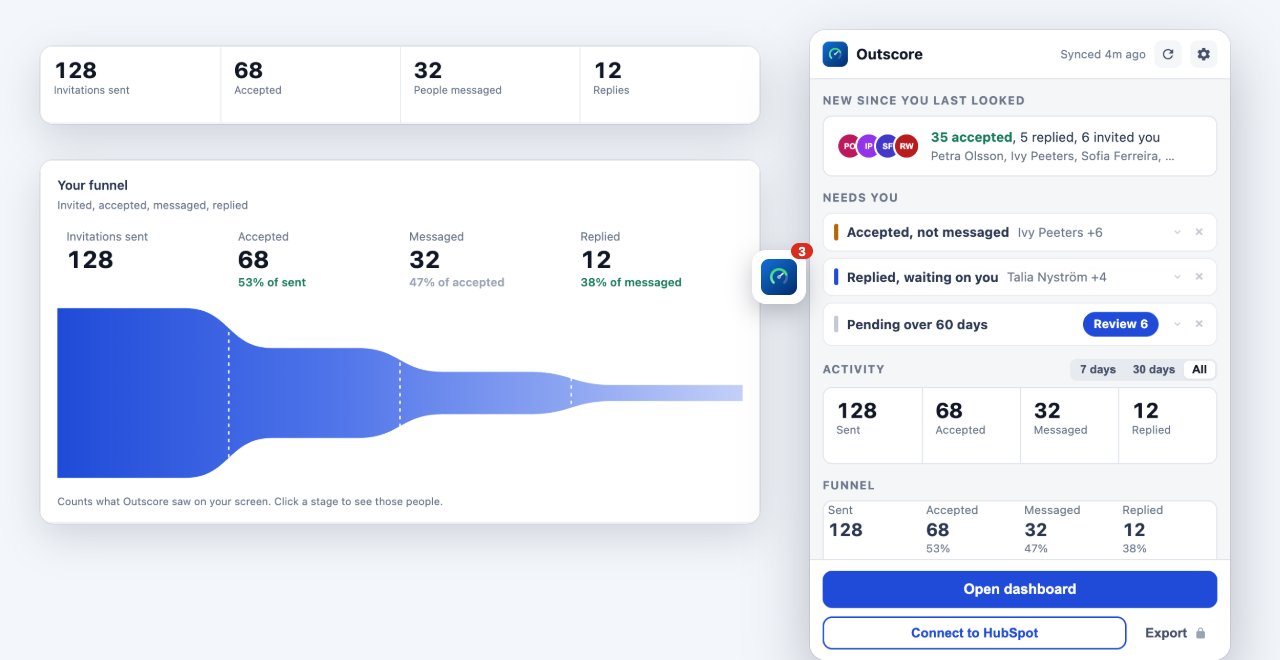
Answer someone and they drop off the list once Outscore sees your reply in the inbox. Decide a conversation does not need a reply and the X puts it aside until you bring it back. A small red number on the Outscore button tells you when something new moved, so you do not have to open the inbox to check.
To be straight about the plan: every new install gets everything for 14 days. After that, the counts and how long people have waited stay free, and the names and one-click actions in Needs you are part of Pro ($10 a month or $49 one-time).
From a to-do list to a reply rate
Once you know who wrote last, you also know your reply rate: of the people you messaged, how many answered. That number tells you whether your opener works, separately from whether your targeting works (that is what acceptance rate measures). The LinkedIn reply rate guide covers the benchmarks and the two-number diagnosis. And if you want an AI to read the conversations and draft the follow-ups for you to send, see how to have Grok review your LinkedIn conversations.
Frequently asked questions
Does LinkedIn have a filter for messages I have not replied to?
No. LinkedIn messaging can filter by Unread and a few other categories, but there is no filter for conversations where the other person wrote last. Unread only shows messages you have not opened, so a reply you read and meant to answer later drops out of it the moment you open it.
How do I see which LinkedIn conversations are waiting on me?
On desktop, scroll your LinkedIn inbox and read the preview line under each name. If it starts with "You:", you sent the last message. If it does not, the other person did, and the conversation is waiting on you. A tracking tool can do this for you: Outscore records who wrote last for each person as you use LinkedIn and lists the ones waiting on you.
Can I mark a LinkedIn message as unread?
Yes. Open the conversation's options menu in LinkedIn Messaging and choose Mark as unread. It is the simplest manual reminder, and it only works if you remember to do it at the moment you read the message.
How do I find people who accepted my connection request but I never messaged?
By hand: open My Network, Connections, sort by Recently added, and check each new connection for a conversation. LinkedIn has no list of accepted-but-never-messaged people. Outscore keeps one: its Needs you list shows people who accepted in the last 14 days with no message seen yet.
Does a tool that finds unanswered LinkedIn messages read my inbox?
Outscore reads the conversation list that is already on your screen when you have LinkedIn Messaging open: who wrote last, when, and the latest line. It never opens a conversation by itself and never sends anything. A full conversation is kept only when you choose to save it.
How quickly should I reply to a LinkedIn message from a prospect?
The same day if you can. A prospect who replied is the warmest your outreach gets, and the attention fades in days, not weeks. A reply that waits a week usually needs a new reason to restart the conversation.