
01
Add people
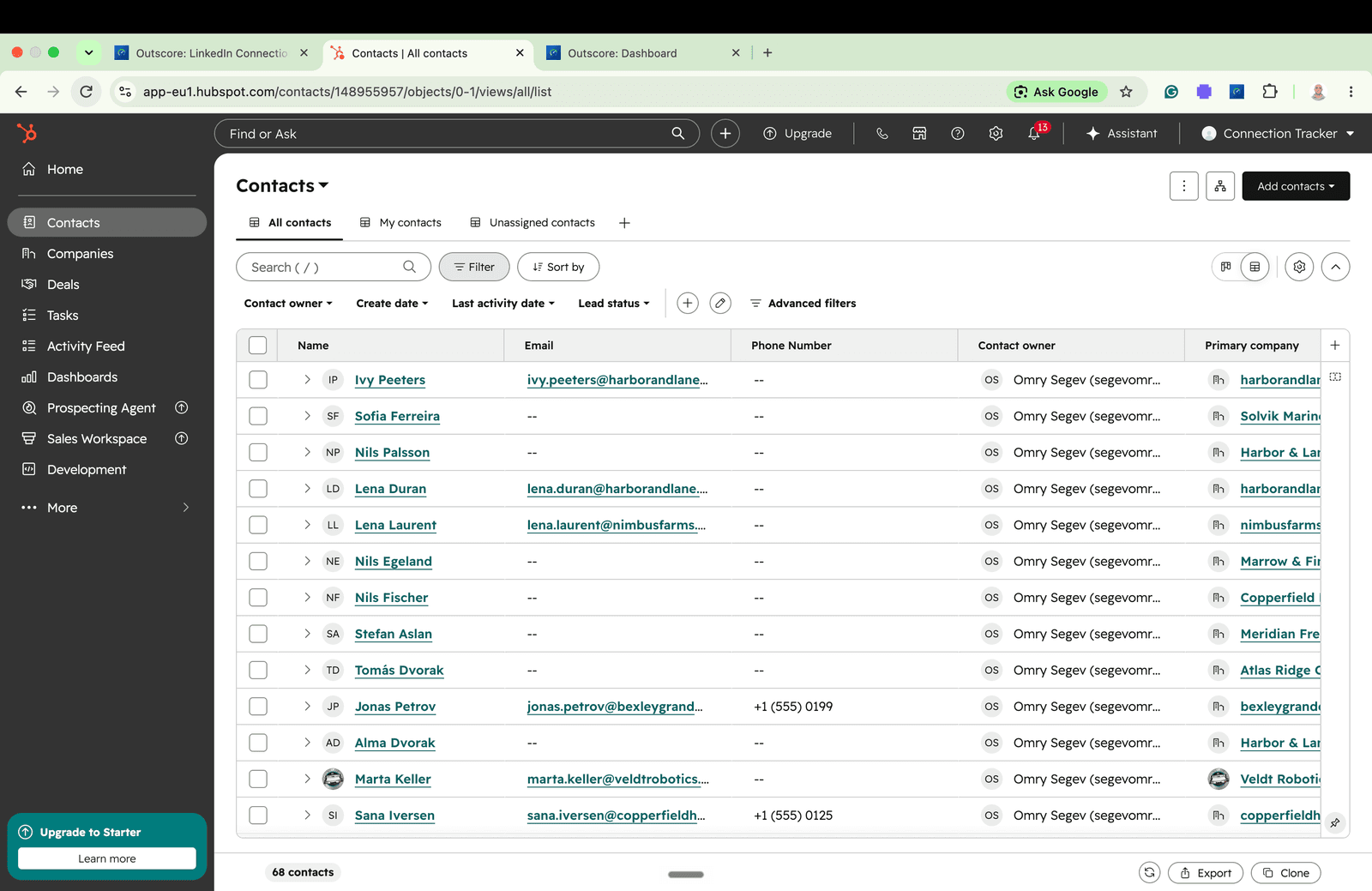
From a LinkedIn profile or a conversation, add the person to HubSpot: name, title, company, profile URL and how you met. Deduped by LinkedIn URL and fill-only, so nothing you already have is overwritten.
Stay on LinkedIn. Outscore tracks your activity by itself, syncs it in one click, and shows your CRM on every profile.
Works with HubSpot. No card required.
5.0 on the Chrome Web Store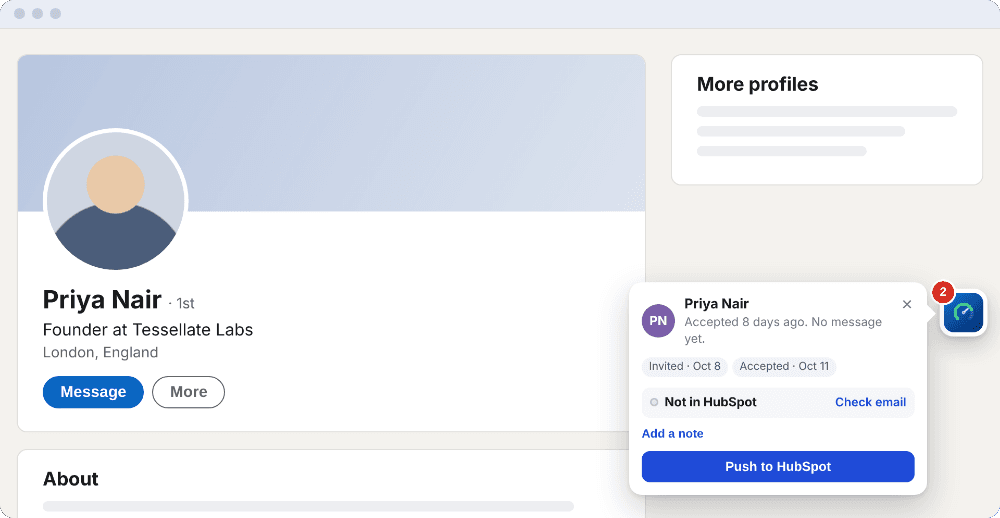
“The LinkedIn-to-HubSpot integration is fast and seamless, connections import automatically with full contact info, no manual data entry required. What used to take hours of copying and pasting into our CRM now happens instantly and accurately.”
From a LinkedIn profile or a conversation, add the person to HubSpot: name, title, company, profile URL and how you met. Deduped by LinkedIn URL and fill-only, so nothing you already have is overwritten.
Log a LinkedIn conversation to the contact, each message dated when it was sent: as notes your AI assistant can read, or as LinkedIn-message activities. Log it again later and only the new messages are added.
Every LinkedIn profile shows whether that person is already in your HubSpot, so you know before you add anyone. What lands on the contact.
Two minutes: tracking that fills itself in, then one click into HubSpot.
If you ask Claude, ChatGPT or another assistant about your pipeline through HubSpot, it can only use what HubSpot holds in a form it reads. HubSpot’s own MCP server, the way AI assistants connect to a HubSpot account, lists notes among the activities it reads and does not list LinkedIn messages.
So Outscore can log each conversation as notes, every message with the date it was sent. Ask “what did I last discuss with Ruben?” and the answer is in your HubSpot. How LinkedIn messages reach HubSpot.
Tools that import everyone you connect with fill HubSpot with people you will never talk to. Outscore adds only the people and conversations you choose, so your CRM stays a list of real relationships, not a copy of your network.
On a team, each rep adds their own people with themselves as owner. The manager sees what reps add and their rates in HubSpot, never their inbox: a conversation reaches HubSpot only when its owner logs it. How the team setup works.
Hublead and Surfe are built for teams that also buy contact data. If what you need is the people you actually talk to, and what you said, in HubSpot, you are paying for credits you will not use.
| Outscore | Hublead | Surfe | By hand | |
|---|---|---|---|---|
| Price for one person | $79 a year, $10 a month, or $99 once | $384 a year (Professional, $32 a month billed yearly) | $468 a year (Essential, $39 a month billed yearly) | Free, plus your time |
| Credits | None | 50 a month on Professional | 150 emails and 50 mobiles a month on Essential | None |
| Who goes into HubSpot | Only the people you pick, from a profile or a conversation | The contacts you import, one by one or from Sales Navigator lists | The contacts you add, with the emails and phone numbers it finds | Whoever you have time to paste |
| Conversations | One click, as notes your AI assistant can read or as activities | One click on Professional, logged on view on Business, live on Scale | One click | Copy and paste into a note |
| Your acceptance and reply rates | Free, on every invitation you send | From Business ($64 a month billed yearly), for contacts in your CRM | Not listed | Counted by hand |
| Finds emails and phones for people you have not met | No | Yes, with credits | Yes, with credits | No |
| CRMs | HubSpot, plus CSV, Google Sheets and webhooks | HubSpot and Salesforce (Salesforce price on request) | HubSpot, Salesforce, Pipedrive, Copper | Any |
Hublead and Surfe list prices from Hublead’s pricing page and surfe.com/pricing, checked October 18, 2026; Hublead’s CRMs and stats checked again October 22, 2026. More detail: Hublead pricing and Hublead vs Surfe.
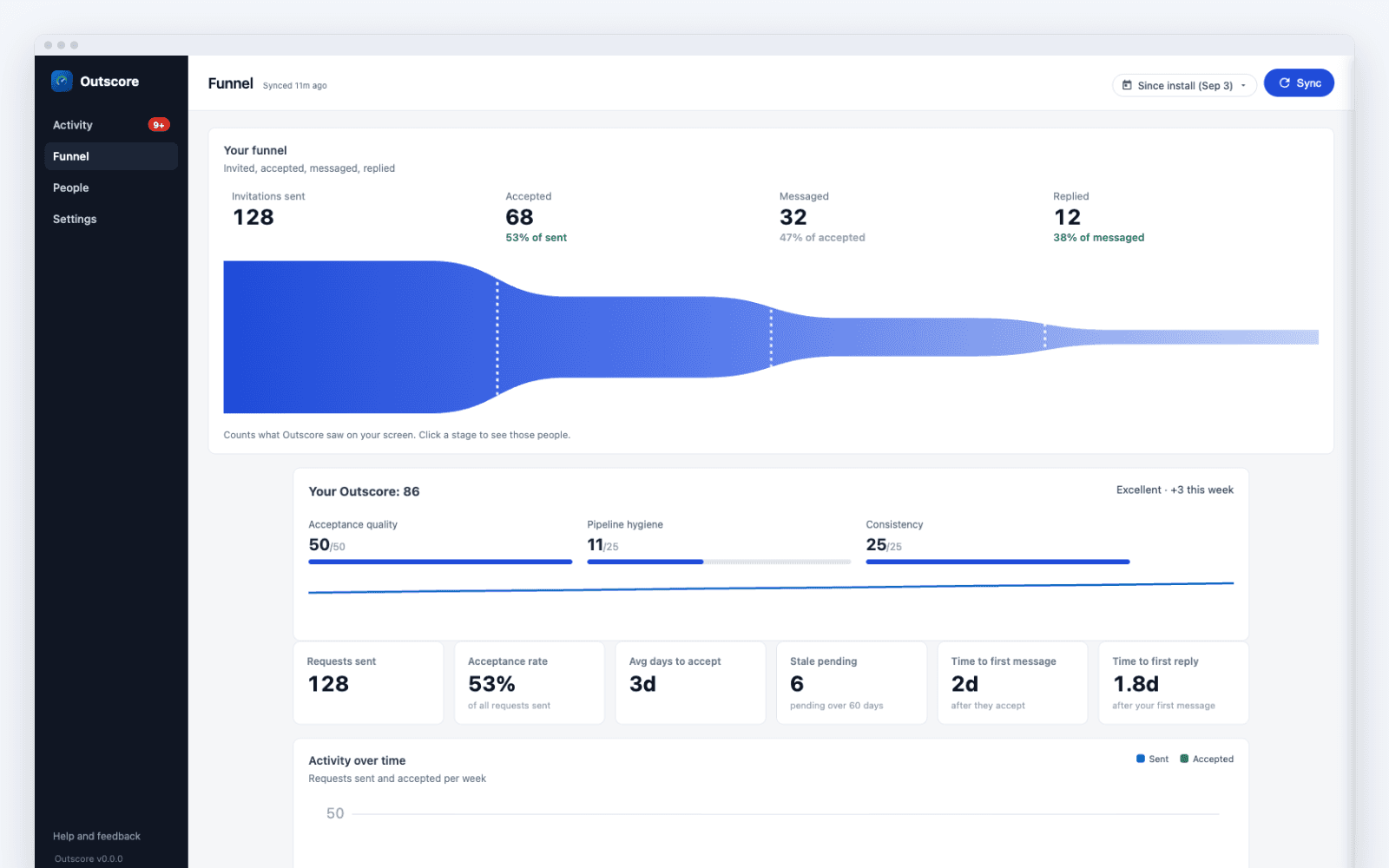
Outscore records every connection request you send and receive while you browse: accepted, pending, declined. You get your real acceptance rate, your reply rate from the conversations you open, and a funnel from invitation to reply, with the rate at every step. It stays free after the trial.
How does yours compare? The average LinkedIn acceptance rate, from seven studies.
Everything is free for your first 14 days, no card. After that your stats stay free, and Pro adds unlimited one-click HubSpot sync. Pro is $79 a year, $10 a month, or $99 once for life. Your choice at checkout.
Every plan, what is free, and what a team pays. Bought lifetime? You keep it for life.
Answers to the things people ask before they install.
Outscore is a Chrome extension for LinkedIn activity tracking and one-click CRM sync. It tracks your LinkedIn activity by itself (invitations, acceptances, replies, and your real acceptance and reply rates) and adds the people you pick to HubSpot in one click, with their company: deduped by LinkedIn URL and fill-only. One more click logs the conversation on the contact, as notes your AI assistant can read or as LinkedIn-message activities. Every LinkedIn profile shows whether the person is already in your HubSpot.
It never sends anything on LinkedIn for you. It is free to start, and Outscore Pro is $79 a year, $10 a month, or $99 once for life.
Yes. You connect with a key you create in your own HubSpot, guided step by step, in about two minutes. It works on HubSpot's free CRM; no paid HubSpot plan is needed.
No. Outscore works on regular LinkedIn. If you use Sales Navigator or Recruiter, the invitations you send there are tracked too.
No. The key you create in HubSpot stays in your browser, and the people and conversations you add go from your browser straight to HubSpot, never through our servers. The LinkedIn data Outscore tracks is stored in your browser too. The extension sends us only anonymous usage counts, never your contacts.
Hublead is $32 per seat per month billed yearly ($40 monthly), includes credits for finding emails and phone numbers, and works with HubSpot and Salesforce. Outscore is $79 a year, $10 a month, or $99 once, with no credits. It adds only the people you pick, logs conversations as notes your AI assistant can read or as activities, and shows your acceptance and reply rates for free.
What Outscore does not do: find emails for people you have not met, or export Sales Navigator lists in bulk. If you need those, Hublead fits better. Hublead facts checked on Hublead's own site in October 2026.
Outscore sends nothing for you: no invitations, no messages. It reads pages of your own account that you could open yourself, such as your sent invitations, and the one action it takes on LinkedIn is withdrawing an invitation you pick, when you press Withdraw.
No tool can promise what LinkedIn will do with an account, and we are not affiliated with LinkedIn, so we will not promise that either. What we can say is that Outscore automates nothing you send.
First and last name, job title, company with an associated company record, the LinkedIn profile URL (which is also how duplicates are prevented), connection status and date, and a timeline note, with you as the owner. The email comes only when the person lists it on their LinkedIn profile; Outscore never looks emails up. Any conversation you log goes on the same contact, each message dated when it was sent.
HubSpot is the CRM Outscore adds to directly today. For any other CRM, export a CSV, or send your data to Google Sheets or a webhook.
Free to start, no card. New installs get everything for 14 days. After that your stats stay free: tracking, acceptance and reply rates, the funnel, the LinkedIn button and side panel, and your first 10 people added to HubSpot. Outscore Pro is $79 a year, $10 a month, or $99 once for life, with no credits and no per-seat fee. Every plan side by side is on the pricing page.
Yes. Each rep runs Outscore on their own LinkedIn and adds the people they choose to the company HubSpot, with themselves as contact owner. The manager reads the per-rep pipeline in HubSpot: rates and counts, never anyone's inbox. A conversation reaches HubSpot only when the rep logs it.
Google Chrome is the supported browser. Other Chromium browsers such as Microsoft Edge, Brave and Arc generally work because they accept Chrome Web Store extensions, but Chrome is the one we test on.
Sourced answers on getting LinkedIn into HubSpot, and on the numbers behind your outreach.
Every way to get your LinkedIn people into HubSpot, deduped by LinkedIn URL, plus what the native Sales Navigator integration does and does not sync.
Getting conversations onto the contact, and the form your AI assistant can read.
Every plan, what a credit buys, and what a team pays in a year.
Price, credits, CRMs, and which one fits your team.
How the tools that move LinkedIn into a CRM actually differ, with prices.
Seven vendor studies put it between 26% and 51%. What the data actually says, and how to measure your own rate.
How many invites you can send per week, who gets more, and what happens when you go over.
What triggers a restriction, how long it lasts, and the prevention checklist that keeps outbound teams sending.
When invites expire, how fast people actually accept, and when to withdraw a stale one instead of waiting.
Add Outscore to Chrome, connect HubSpot in about two minutes, and add your first 10 people free. No card required.